Austin JavaScript · October 2026
Small decision
models, big
UX benefits.
Section 01 of 05
Chat is slow.
Users expect instant. LLMs take seconds.
- Chat is slow
- Decision models
- One app, for clickers and chatters
- System One first
- Make it yours
Quick poll
Who here has built a chatbot?
Keep it up if it shipped to real users.
Keep it up if they still use it.
Latency
Users expect instant. LLMs answer in seconds.
Higher odds a visitor bounces, vs. a 1 s page load
Google/SOASTA mobile benchmarks, 2017 · Zones: Nielsen's response-time limits · Bands are orders of magnitude
Section 02 of 05
Decision models.
Pick the answer instead of writing it.
- Chat is slow
- Decision models
- One app, for clickers and chatters
- System One first
- Make it yours
RLCD · decision models
A decision model answers questions. It never writes text.
System One fast, focused judgments, like this · System Two slow, deliberate reasoning, like an LLM (Kahneman)
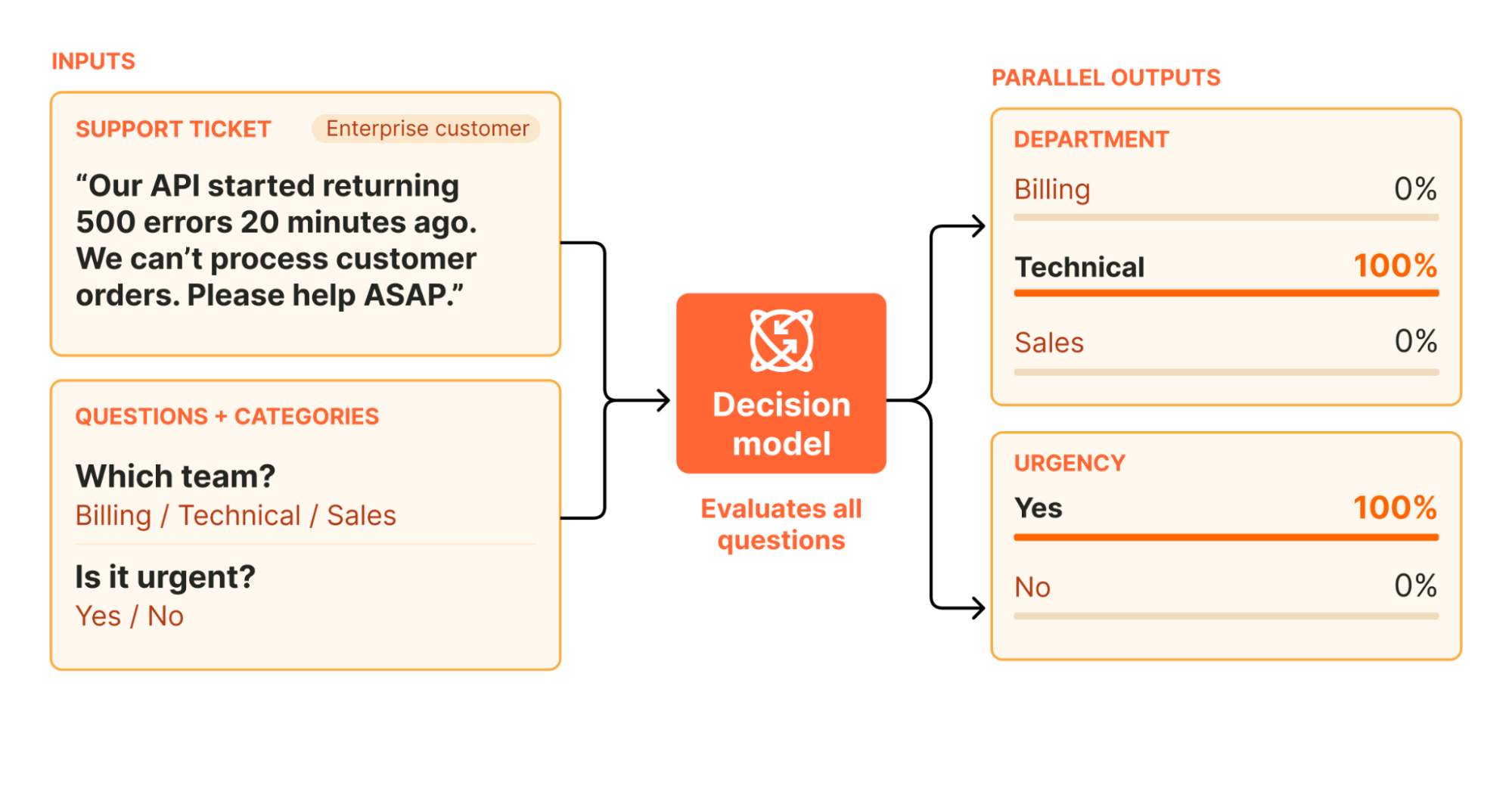
- In: the state, plus typed questions: choice, score, yes/no.
- Out: a probability for every allowed option. Nothing to parse.
- RLCD (RL for calibrated decisions) makes the probabilities honest: when it says 80%, it's right about 8 times in 10.
- Jev (TypeSafe) started it. Clef (Cloudflare) is open weights.
Under the hood
Write the answer, or pick it.
Ticket Our API started returning 500 errors 20 minutes ago. Please help ASAP.
LLM
writes it out
0.00 s 0 forward passescan break
- {"department":
- "technical",
- "frustration":
- 1,
- "is_urgent":
- "yes"
- }
- … +54 tokens
One full forward pass for every token, one after another.✗ "yes" is a string, not true/false. The JSON fails validation, so try again.
Decision model
picks from options
0.00 s 0 forward passes~9× faster, always valid
departmentkeep 3 of ~150ktechnical1.00billing0.00sales0.00
frustrationkeep 3 of ~150kfrustrated0.67calm0.33very_angry0.00
is_urgentkeep 2 of ~150ktrue0.99false0.01
Example and probabilities: Jev quick start · Decision-model time: measured p50 in our app · LLM time: illustrative
What TypeSafe measured
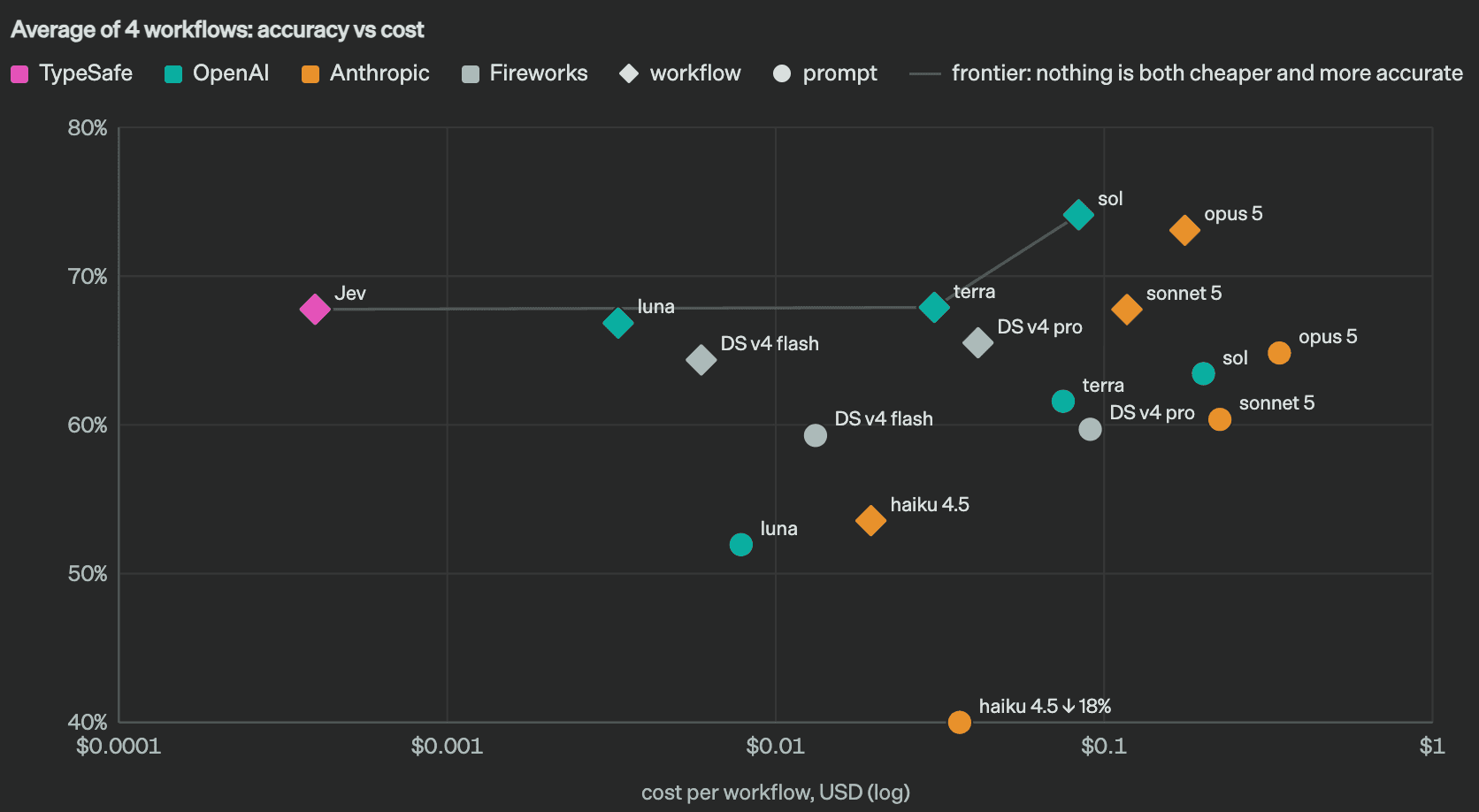
Jev: 68% accurate, at $0.0004 a workflow.
- Structured-output errors
- 0%Jev
- 0.58–45.5% across 10 LLMs
- Tool-call errors
- 0%Jev
- 0.67–17% across 10 LLMs
Mid-tier LLMs score about the same for $0.003–0.03. Jev's 0% errors are by design: it can only return an allowed option.
TypeSafe, “Introducing System One Models & Jev” · evals. LLM error rates: OpenRouter traffic, per TypeSafe. Vendor numbers; TypeSafe flags likely bias.
Section 03 of 05
One app, for clickers and chatters.
The chat drives the same actions as the UI.
- Chat is slow
- Decision models
- One app, for clickers and chatters
- System One first
- Make it yours
UX
Clickers or chatters: let people pick.
Traditional UI
- Precise and scannable
- Shows you what's possible
- Fast once you've learned it
Chat

- Say what you want, not where it lives
- Forgiving of vague requests
- Nothing to learn
The chat can do anything the UI can, and nothing it can't.
How I build in 2026
One schema. Every kind of client.
Clickers and chatters run the same workspace actions.
Agents get MCP and REST from the same spec.
Planned: WebMCP lets browser agents use the page itself.
Change a route once. Every client follows.
The backbone
Hono + Zod: the route is the contract
import { createRoute, z } from '@hono/zod-openapi';
import { priceHistorySchema } from '../models/index.js';

export const getPriceHistory = createRoute({
  method: 'get',
  path: '/price/{ticker}',
  operationId: 'getPriceHistory',
  request: {
    params: z.object({ ticker: z.string() }),
    query: z.object({
      start: date('start'),
      end: date('end'),
    }),
  },
  responses: responses(priceHistorySchema),
});
import { OpenAPIHono } from '@hono/zod-openapi';
import { routes } from '../openapi/index.js';

const app = new OpenAPIHono();

app.openapi(routes.getPriceHistory, async (c) => {
  const { ticker } = c.req.valid('param');
  const { start, end } = c.req.valid('query');
  return c.json(
    await domain.getPriceHistory(ticker, start, end),
    200,
  );
});
Generated from the spec
Write the route once. The clients come free.
API docs via Scalar
import { Scalar }
  from '@scalar/hono-api-reference';

app.get('/docs', Scalar({
  content: openApiDocument(),
  pageTitle: 'API Reference',
}));
MCP server
import { openApiMcpServer }
  from '@cloudflare/codemode/mcp';

openApiMcpServer({
  name: 'research',
  spec: curatedSpec,
  executor,
  request: (op) =>
    execute(op, principal),
});
React client generated by Hey API
// Hey API: spec → typed client
import { defineConfig }
  from '@hey-api/openapi-ts';

defineConfig({
  input: openApiDocument(),
  plugins: ['@hey-api/sdk'],
});

// generated: one fn per operation
import { getPriceHistory }
  from './generated/sdk.gen.js';
await getPriceHistory({
  path: { ticker },
});
REST is the routes themselves. Agents only see the operations you choose to expose.
The agent
Flue runs the agent. The decision model goes first.
Flue: an open-source TypeScript agent framework from the Astro team, now at Cloudflare. Built on the Pi harness. On Cloudflare, each agent is a Durable Object.
The LLM's tools are the page's workspace actions. It reads the catalog, then calls browser_action.
'use agent';
import { useModel, useTool, type AgentProps } from '@flue/runtime';
import { createJevResolveTool } from '../lib/jevResolveTool.js';
import { createBrowserBridgeTools } from '../lib/browserBridgeTool.js';
import { ROUTER_PROVIDER_ID } from '../lib/jevRouterProvider.js';

export function ResearchAgent({ id }: AgentProps) {
  // Router model: the decision model first, the LLM only if unsure
  useModel(`${ROUTER_PROVIDER_ID}/${plannerModel()}`);

  const bridge = createBrowserBridgeTools({ endpoint /* … */ });
  const tools = [
    createJevResolveTool({ /* … */ }), // decision model: route + arguments
    bridge.catalogTool,                // browser_action_catalog
    bridge.invokeTool,                 // browser_action
  ];
  for (const tool of tools) useTool(tool);

  return plannerPrompt; // the LLM's system prompt
}
The browser bridge
A Durable Object bridges the agent and your tab
- You hit send. The page advertises what it can do right now.
- The agent calls
browser_actionwith an action, input, and epoch. - The DO checks it against that catalog and hands it to the tab's long-poll.
- The tab asks you, claims the command, and dispatches it through the registry.
- The page reports what it installed, plus its new catalog.
- The agent gets that receipt back as its tool result.
Durable Object admit long-poll tab: confirm → claim → dispatch
Under the hood
A workspace action is a typed handler.
import { z } from '@hono/zod-openapi';
import { defineBrowserAction } from './browserActionRegistry.js';

export const sortTableCommand = z.object({
  column: z.enum(SORT_COLUMNS),
  direction: z.enum(['ascending', 'descending']),
}).strict();
defineBrowserAction({
  name: 'ui:comparison.sort',
  description: 'Order the comparison table by ticker, count, or an outcome. Runs nothing.',
  requires: ['comparison_workspace_visible'],
  input: sortTableCommand,
  invoke: (controllers, input, grant) => controllers.comparison?.sortTable(input, grant),
});
// A click calls the same controller method
<ComparisonResults onSortChange={(next) => actions.sortTable(next, HUMAN)} />
A schema, a description, one handler. The click and the agent call the same one.
Section 04 of 05
System One first.
Ask multiple choice. Hand off to the LLM when unsure.
- Chat is slow
- Decision models
- One app, for clickers and chatters
- System One first
- Make it yours
Routing
System One first. System Two only when it's unsure.
Confident? Act now. The goal is for most requests to take this lane.
Unsure, multi-step, or wants a written answer? The LLM takes it.
Set it up to win
“Is this an action?”
Open world: every action in the app, plus any the model makes up.Closed world: only what this view can do.

- “sort by return, best first”
is this
0.96ui:comparison.sort? - “sort by return, best first”
is this
0.02ui:shell.navigate? - “sort by return, best first”
is this
0.01ui:shell.chatPanel? - “sort by return, best first”
is this
0.01conversation? - “sort by return, best first”
is this
0.00unsupported?
Set it up to win
Ask multiple choice, not fill-in-the-blank.
Open world
“What should happen?” Any action, any value.
updateWorkspaceStudyselectWorkspaceEventui:ticker.sortui:ticker.selectOccurrenceui:dashboard.filterui:dashboard.sortui:watchlist.sectionui:watchlist.alertFiltermarkAllAlertsReadcompareWorkspaceStudyui:comparison.sortui:shell.navigate…every value as free text
Closed world
“Which of these?” Only what this view can do.
ui:comparison.sortui:shell.navigateui:shell.chatPanelconversationunsupported
Values come from code: tickers in your catalog, numbers in the text, events on screen.
The model never invents a value. It only picks one the code found.
The real questions
One request, four questions, all answered at once.
Request on the comparison pagesort by average return, best first
routechoice · the workspace action
What is the user asking the visible workspace to do?
ui:comparison.sort0.96ui:shell.navigate0.02ui:shell.chatPanel0.01conversation0.01unsupported0.00
multi_stepyes/no
Two or more distinct changes, each needing its own action?
yes0.03no0.97
sort_columnchoice · a field
Which column of the comparison table should order the rows?
avg_return0.93avg_max_excursion0.03current_return0.02count0.01- + 8 more: ticker, avg_min_excursion, none…
sort_directionchoice · a field
Which way should the rows be ordered?
descending0.91ascending0.06unstated0.03
Every answer clears its floor, so the page runs ui:comparison.sort with avg_return, descending.
Multi-step
Two changes? Decide, run, ask again.
Request on the dashboardopen Comparison and sort by return
-
1 · first batch
multi_stepyes 0.94 → start a sequenceroute→ui:shell.navigate0.92runs:
{ view: "comparison" } -
2 · ask the route again
Already done: opened the comparison.
Now on: the comparison.route→ui:comparison.sort0.95runs:
avg_return,descending -
3 · ask once more
Already done: opened the comparison. Sorted by average return.
route→nothing_left0.97done
Each step re-asks over the page's fresh action list. Code writes the "Already done" lines from receipts. If a step can't settle, the LLM takes the rest of the turn.
Section 05 of 05
Make it yours.
Your data, your thresholds, your model.
- Chat is slow
- Decision models
- One app, for clickers and chatters
- System One first
- Make it yours
Step 1 · Synthetic data
Start with data you generate, answer first.
You can't wait for users before you have a model.
- Fix the answer first. Choose the action and its arguments before any text exists.
- Render it as requests. An LLM writes the ways people might actually ask.
- Perturb it. Typos, slang, missing details, things you don't support.
- Calibrate on it. Good enough to ship behind the LLM fallback.
Synthetic accuracy isn't real-world accuracy. Keep it tagged as synthetic, forever.
Step 2 · Calibrate
So where does τ come from?
A floor per decision: which action (0.82), then each argument (0.75).
Tuned on 657 test turns: 386 right / 16 wrong became 273 right / 0 wrong.
Step 3 · Real labels
Then let your users improve it.
“It did X. It should have done Y.” Plus the trace of what the model said.
- human_gold
- verified by a person; the answer key
- llm_judge
- a blind, stronger model's call
- llm_silver
- the fallback LLM's answer in production
- synthetic
- generated, answer first
Going further
Shrink the world → learn the domain → calibrate the call
Candidate generation
Model learning
Decision control
Open world: every ticker you track, every way to read the request. The model has to find a needle.
Exact and fuzzy matching on names and aliases keep only what the words could mean.
Named-entity recognition (NER) catches names string matching misses, like “Google's parent”, without reopening the world.
Off the shelf, it hedges between share classes. Your labels teach it the one your app uses.
τ sets the trade. Raise it: fewer wrong actions. Lower it: fewer hand-offs to the LLM.
Above τ, a typed value goes straight into the action. Below it, the LLM takes the turn.
Step 2 · Extract
NER
Named-entity recognition: a small model that tags names in text. “Alphabet” → ORG · Alphabet Inc.
Clairic new · Oct 19, 2026
Cloudflare's System One extraction model: typed values (dates, amounts, spans) in one pass, under a second. We're evaluating it.

Step 3 · Train · two different things
Fine-tune you · supervised
Train on your labeled examples (LoRA adapters). Clef ships open weights, so you can.
RL post-training provider-hosted · coming
Rewards from production traffic update the weights; Cloudflare runs the loop and serves the checkpoint.
Our app does neither yet. It re-tunes the floors (step 4); no weights change.
The ecosystem
Fine-tune it. Host it. Make it yours.
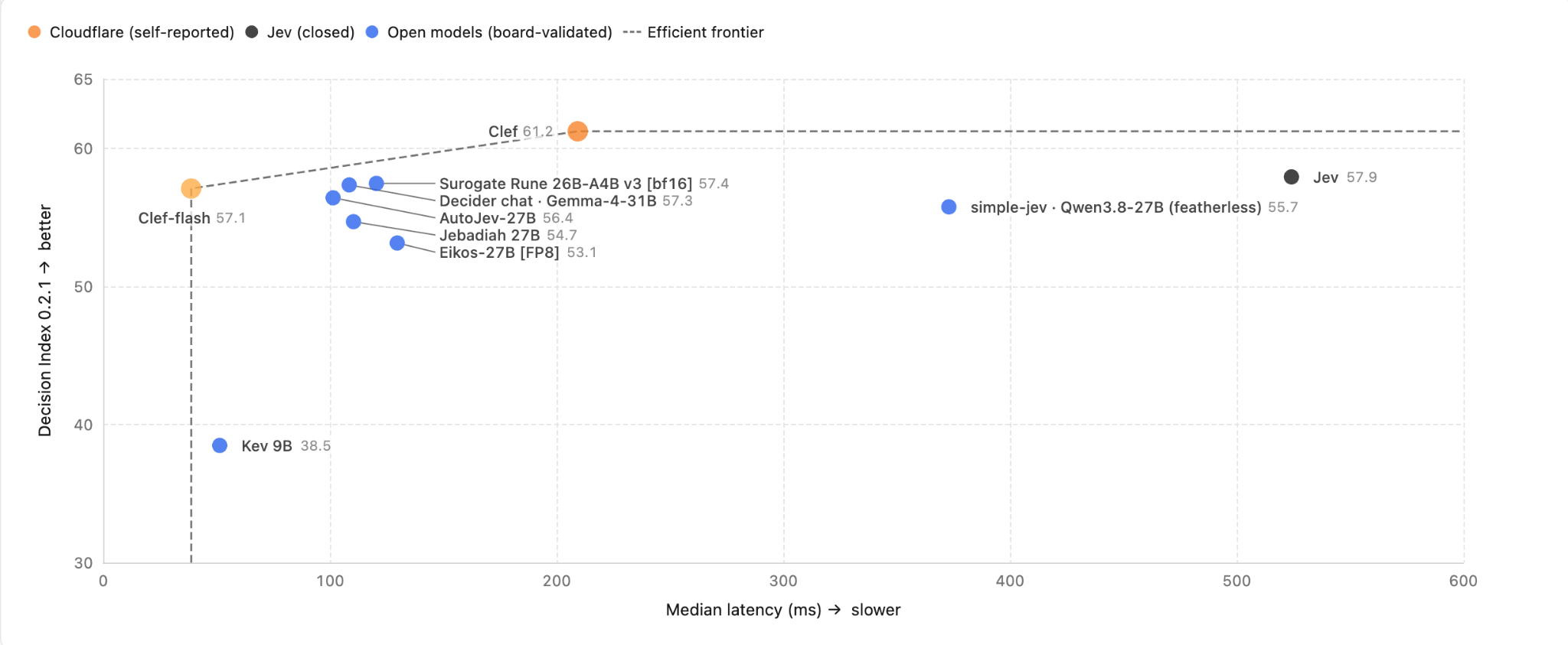
- Clef: open weights, Apache 2.0. A Qwen backbone, a small schema head, LoRA adapters.
- GPUs: an H100 rents for about $2–4 an hour.
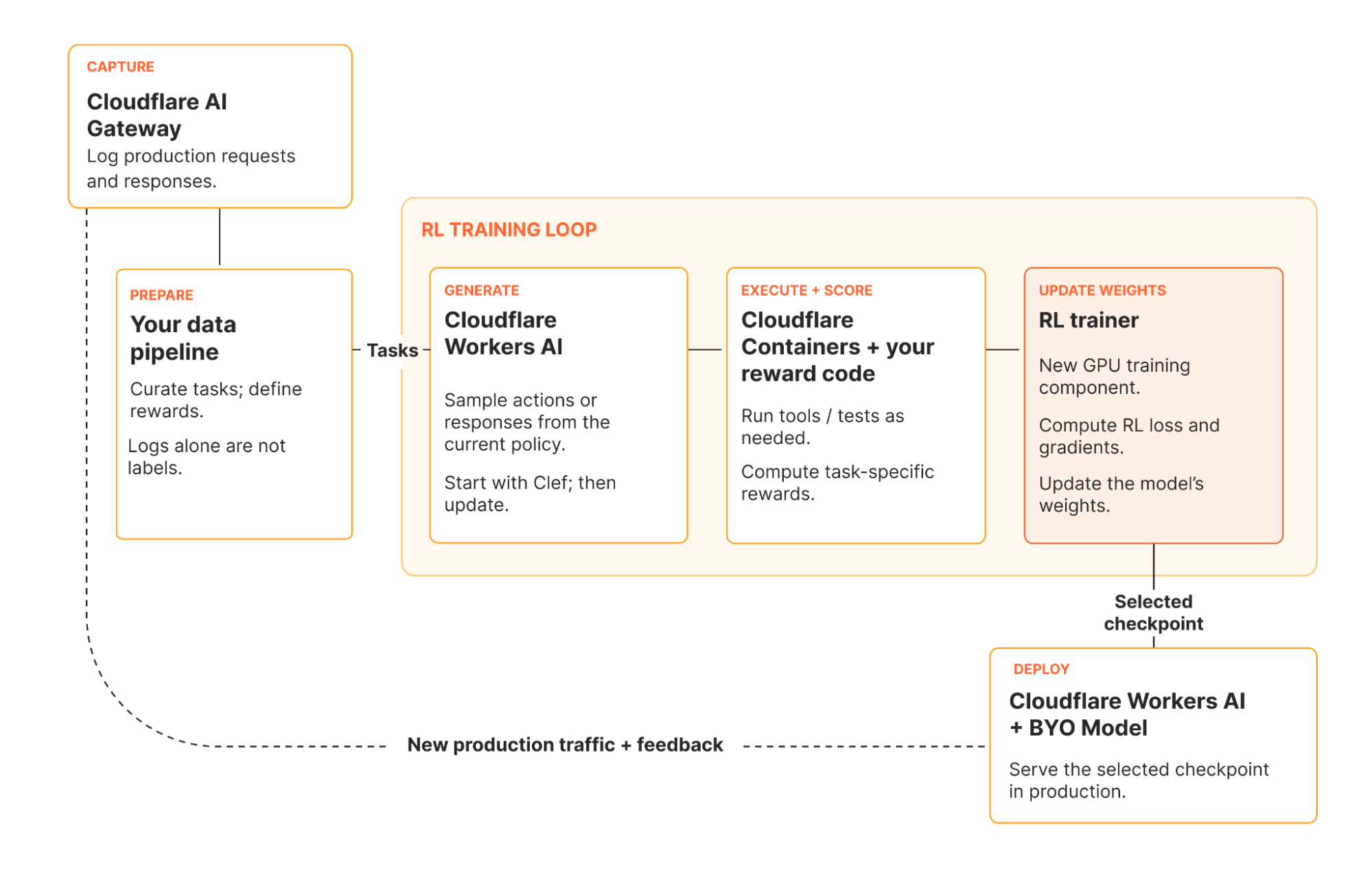
Cloudflare, “Clef decision models” (Oct 2026) · H100 pricing: Runpod, Lambda, Oct 2026
Live demo
Now, the app.
- Click, then ask. Sort the table by hand, then ask the chat. The same action runs both times.
- Both lanes. A clear request runs in about 0.3 s. A vague one goes to the LLM.
- Multi-step. “Open Comparison and sort by return.”
- The loop. Report a wrong answer, replay the floors, promote.
Thanks
Small models.
Big UX.
New this week · Cloudflare
System One can read, too.
Clairic fills typed fields from text or images in one pass: no tokens generated, under a second.
- Extracts spans, computes numbers and dates, estimates with an 80% range.
- System One extracts, System One decides, System Two writes. Cloudflare's claim demo (Clairic → Clef → LLM): 19.3 s vs 61.7 s all-LLM, 49% cheaper.
- Not in our app yet. We're evaluating it for the long-tail step: reading dates and amounts the code can't match.
Cloudflare, “Introducing Clairic, a new System One class of extraction models” (Oct 19, 2026). Vendor numbers.
Live demo
Close the loop.
Report a wrong answer, replay the floors against every golden case, then promote.
Live demo
Watch both lanes.
A clear request takes the fast lane. A vague one goes to the LLM.
Live demo
The chatbot.
Live demo
One app, two ways in.
Click through it like any app, or just ask for what you want.
RLCD · decision models
Same request. Two ways to answer.
Ticket“Our API started returning 500 errors 20 minutes ago. Please help ASAP.”
Decision model
Jev / Clef · decides
0.00 sticket + 3 typed questions → one parallel pass
departmentchoicetechnical100%frustrationscorefrustrated67%is_urgentyes/notrue99%→ route to technical, flag urgent
LLM
generates · then parses
0.00 s→ parse JSON · validate · run
Example: Jev quick start · Decision-model time: measured p50 in our app · LLM time: illustrative
Under the hood
One forward pass, or one per token.
LLM
generates text
0.00 s 0 forward passesui0.81sort0.07comparison0.05table0.03
Decision model
picks from options
0.00 s 0 forward passesui:comparison.sort0.96ui:shell.navigate0.02conversation0.01unsupported0.01
About me
I train models, and I ship the apps that use them.
ML engineer
- Classifiers and decision models
- Calibration and evaluation
- Fine-tuning small models
Builder
- Web apps
- Agents and MCP servers
- The glue between them
Meanwhile
Our users' brains are being trained on chat.
Every hour in ChatGPT or Claude makes a text box feel more natural, and a wall of dropdowns feel like work.
Why merge them
One experience beats a chatbot bolted on the side.
Chat for intent, UI for precision
Say roughly what you want, then fine-tune it with the controls.
One state, two views
When chat changes something, the UI shows it. When you click, the chat knows.
The chat teaches the UI
People watch their request happen on screen and learn where things live.
Live call
Try it: ask for something
The ML part
Good thresholds need good labels.
Measure
Five numbers, in plain English
- Calibration
- When it says 90%, is it right 90% of the time?
- reliability diagram, ECE
- Precision
- When it acts, how often is it right?
- TP / (TP + FP)
- Recall
- Of everything it should catch, how much does it?
- TP / (TP + FN)
- F1
- One number that balances the two.
- harmonic mean of P and R
- AUROC
- How well it ranks right above wrong, at every threshold.
- threshold-free ranking
Going further
Make it smaller, cheaper, and yours.
Upstream filtering
Narrow the options first
Regex, dictionaries, and NER propose candidates. The model can't pick an option it was never shown.
Fine-tuning
Train on your golden set
Fine-tune a small open model. Ship it only when it beats the hosted baseline.
The ecosystem
Small models win
Cheaper to run, faster to answer, and they're yours.